How to Use Watermarks to Protect Your Digital Art

As a freelance graphic designer, protecting your digital artwork from unauthorized use is crucial. Watermarks are an effective tool for safeguarding your work, allowing you to showcase your creativity while ensuring you receive proper credit. By adding a watermark, you can deter potential thieves and maintain control over your intellectual property.
What exactly is a watermark and why do I need one?
A watermark is a recognizable image or text overlaid on your artwork that identifies ownership and protects against unauthorized use. It signals that the artwork is not free to use without permission. Without a watermark, your digital art is at risk of theft, as individuals can easily download and share your work without crediting you. This not only undermines your brand but also reduces potential income opportunities. By using a watermark, you create a visual deterrent against unauthorized use, reinforcing that your art is your intellectual property.
What are the different types of watermarks I can use?
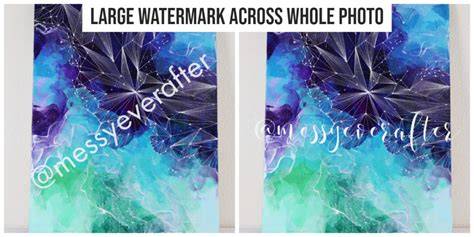
Watermarks generally fall into two categories: visible and invisible. Visible watermarks are apparent on the artwork, often placed in a corner or as a semi-transparent overlay across the image. They are effective in deterring casual theft because anyone who shares your art must deal with the watermark, which can disrupt the visual appeal. Invisible watermarks, on the other hand, are embedded within the digital file and are not visible to the naked eye. These are useful for proving ownership in disputes but do not prevent theft in the same way. Depending on your goals, you might choose to use one or both types. For example, if you're sharing your work on social media, a visible watermark may be best, while an invisible watermark could serve as additional security.
How do I create a watermark for my artwork?
Creating a watermark is straightforward with graphic design software like Adobe Photoshop or Illustrator. Start by designing your watermark, which could be your name, logo, or a combination of both. Choose a font and color that complements your artwork without overpowering it. Save your watermark as a separate file, preferably in PNG format with a transparent background for easy overlay on different pieces. In Photoshop, create a new layer for your watermark, position it where you'd like on the image, and adjust the opacity to ensure it’s visible but not intrusive. Screenshots can help visualize these steps, making the process easier to follow.
How do I apply a watermark to my digital files?
Applying your watermark to digital files is a simple process. For JPEGs, open your artwork in your graphic design software and import your watermark file as a new layer. Resize it to fit the composition and adjust the opacity as needed. Once you’re satisfied with the placement, save the image as a new file to preserve the original. For PDF files, many PDF editors allow you to add images or text overlays. Import your watermark, resize and position it before saving the document. It’s good practice to save a copy of your original artwork without the watermark for future use.
What should I consider when using watermarks for my portfolio?
When incorporating watermarks into your portfolio, placement and visibility are key. You want your watermark to be noticeable enough to deter theft but not so large that it distracts from your artwork. A common practice is to place it in a corner or along the bottom of the piece. Test different sizes and opacities to find a balance that works for you. Additionally, consider the viewer experience; an overly aggressive watermark may turn potential clients away. Keep in mind that your goal is to showcase your talent while still protecting your art. Regularly review and adjust your watermarks as your style and brand evolve.
Conclusion
Design a watermark that reflects your brand and apply it consistently across your digital art. Focus on visible watermarks for online sharing while considering invisible ones for added security. The right watermark will help protect your work and ensure you receive the recognition you deserve.
Frequently Asked Questions
What is the best way to watermark my digital art?
The best way to watermark your digital art is to create a clear and recognizable watermark using graphic design software. Apply it to your artwork in a way that it’s visible but doesn’t overpower the piece, ensuring it deters theft while showcasing your work.
Can I use a watermark on social media?
Yes, using a watermark on social media is common and recommended. It helps protect your work from being shared without credit and reinforces your brand identity.
Are invisible watermarks effective?
Invisible watermarks can be effective for proving ownership, as they are embedded in the digital file and not visible. However, they don’t prevent theft, so consider using them alongside visible watermarks.
How do I make my watermark less intrusive?
To make your watermark less intrusive, adjust its opacity so it blends more subtly with the artwork. You can also experiment with size and placement, opting for a corner or edge of the piece.
Do I need to watermark every piece of art?
While it’s not mandatory to watermark every piece, it’s a good practice, especially for works you plan to share online or submit to clients. This helps protect your work from unauthorized use.